

What Does RTX (RTX) Actually Do?
A plain-English map of RTX’s aerospace-and-defense engine, where earnings come from, and what to track in SEC filings

Table of Contents
A plain-English explanation of RTX’s business model (commercial aerospace + defense primes)
What does RTX (RTX) actually do? In plain English, RTX is an aerospace-and-defense company that sells high-technology products and long-lived services into two big end markets:
- Commercial aerospace (aircraft and engines, plus the parts and maintenance that follow)
- Government/defense (programs for the U.S. government and allied nations, often through long-term contracts)
A helpful way to frame RTX is as a portfolio of three large operating segments that mix “build it once” manufacturing with “support it for decades” aftermarket service.
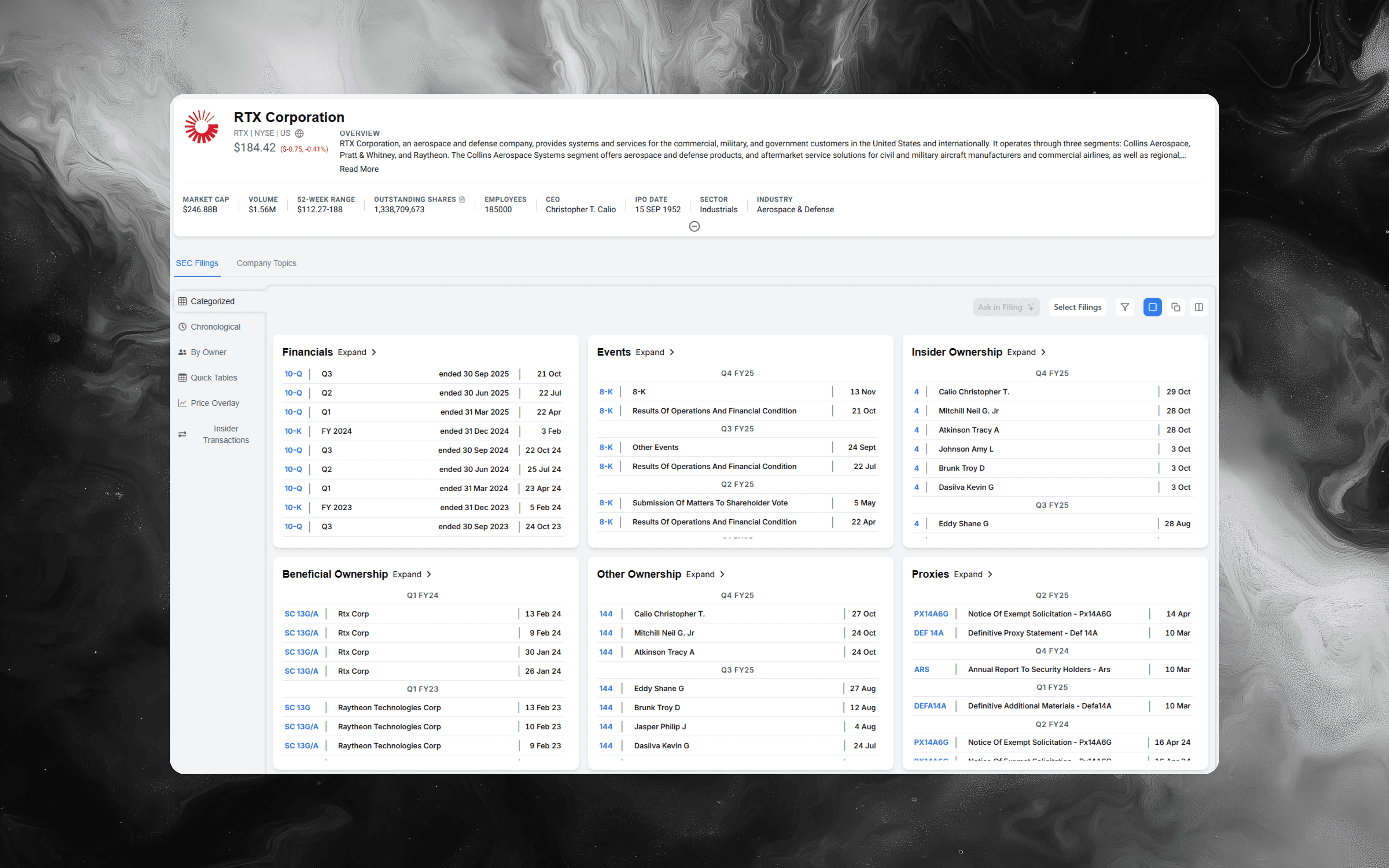
If you want the primary-source foundation (how RTX describes each segment, how it recognizes revenue on long-term contracts, and what management flags as the big swing factors), start with the filings in Alpha Analyst here: RTX Corporation (RTX)
The fastest mental model: three engines, two cycles
RTX can look complicated because it spans both commercial aviation and defense. A simple “two-cycle” model helps:
-
Commercial aerospace cycle
OEM production ramps create initial equipment sales; the installed base then drives higher-margin services, parts, and maintenance over time. -
Defense cycle
Multi-year program awards create backlog; revenue and profit show up as programs are executed, milestones are achieved, and costs are managed versus plan.
Those two cycles coexist inside the same company, but they behave differently in a downturn, during supply chain stress, or when budgets and geopolitics shift.
What RTX sells (in analyst language)
RTX reports three principal segments:
-
Collins Aerospace
Aerospace systems and services that go onto aircraft and stay there for the life of the platform. Think broad content across airframes and avionics/system categories, plus spares and services. -
Pratt & Whitney
Aircraft engines and a large services footprint tied to maintaining and overhauling engines in the field. This segment often has meaningful “installed base” dynamics (shop visits, spare parts, service agreements). -
Raytheon
Defense products and services, with a large share tied to government customers and long-term defense programs.
In the filings, RTX explicitly describes its operations as classified into these three principal segments.
Where RTX’s revenue actually comes from (products vs services)
A high-signal way to read RTX is to keep one split in your head every quarter:
-
Products revenue
Deliveries of manufactured aerospace and defense equipment. -
Services revenue
Aftermarket parts, maintenance, repair/overhaul, sustainment, and other support activity tied to the installed base and long-term contracts.
This matters because the drivers are different. Product revenue can be sensitive to production rates and program schedules, while services often track utilization, maintenance cycles, fleet size, and contractual coverage.
How RTX makes money: the operating loop that connects backlog to earnings
A practical operating loop for RTX looks like this:
-
Win content or programs
In commercial aerospace, that’s getting designed onto platforms and engines (and then supporting them). In defense, it’s competing for program awards and contract funding. -
Convert backlog into revenue
RTX discloses large backlog figures, and it breaks backlog out by segment. Backlog is essentially future revenue already “booked” but not yet recognized. -
Manage execution on long-term contracts
A big portion of RTX’s work involves complex equipment and multi-period performance. That means estimates matter: schedules, labor productivity, material availability, and subcontractor performance. -
Control program profitability through estimate discipline
In long-term contracting businesses, profitability can change when the company updates its estimate of total revenues and total costs to complete a program. Those estimate changes can create favorable or unfavorable profit adjustments. -
Turn earnings into cash (or don’t)
For contract-heavy companies, cash conversion is heavily influenced by working capital (billings vs costs incurred, inventory, contract assets/liabilities, and timing of customer payments).
Analyst takeaway: for RTX, “reported growth” is less informative than “quality of growth.” You want to know what’s growing (OEM vs aftermarket, defense vs commercial), under what contract structure, and with what risk to estimates.
Two RTX-specific concepts to understand before you read the numbers
1) Backlog is a real operating variable (not just a marketing stat)
RTX reports total backlog and segment backlog. Backlog tends to rise with bookings/orders and fall as revenue is recognized. For defense work in particular, backlog and bookings can be a forward-looking lens into demand and future capacity needs.
A simple diligence question to ask each quarter:
- Did backlog grow because of new awards, or because programs are slipping and not converting to revenue?
2) Contract estimates can move profit faster than revenue moves
Because RTX performs a meaningful amount of work over time, changes in estimates can create profit volatility. In the filings, you’ll see discussion that the company reviews estimated costs at completion and recognizes impacts when assumptions change.
A simple diligence question to ask each quarter:
- Did margins change because the business improved, or because estimates were updated?
One recurring “watch item” example: Pratt & Whitney’s Powder Metal Matter
RTX’s filings discuss a Pratt & Whitney issue referred to as the Powder Metal Matter, including inspection-related operational impacts and expected customer support/mitigation costs.
You do not need to be an engineer to track it like an analyst. Treat it as a structured checklist:
- Operational scope: which fleet/components are impacted, and what actions are being taken
- Timing: expected duration of increased shop visits and disruption
- Cost and cash: support costs, repair/inspection capacity constraints, and timing of cash outflows
- Customer negotiations: how compensation and credits may flow through the financials
- Spillover risk: whether other engine models could be affected
The point isn’t to predict the outcome from headlines. It’s to monitor how the company updates assumptions and how those assumptions map to income statement and cash flow line items over time.
The three metrics that explain many RTX quarter-to-quarter moves
You can often explain a large portion of RTX’s quarter-to-quarter narrative with three buckets:
-
Segment sales and segment operating profit
Focus on mix: commercial OEM vs commercial aftermarket vs defense programs, and whether changes are broad-based or concentrated in one segment. -
Backlog and bookings (especially in defense)
Use these as a “demand + pipeline” view, then validate whether conversion to sales looks smooth or lumpy. -
Working capital and cash conversion
Track whether contract assets/liabilities and inventory are moving in ways consistent with the story management is telling (production ramps, supply chain constraints, program milestones).
How to read RTX filings like an analyst (repeatable checklist)
Use this process on each 10-Q and 10-K:
-
Start with the segment view, not consolidated EPS
RTX is three big businesses under one ticker. Begin with segment sales and segment profit, then ask what changed and why. -
Separate commercial aerospace from defense dynamics
Even inside the same segment, commercial OEM and aftermarket can behave differently. Don’t let a single blended margin hide mix shifts. -
Look for estimate language and program execution signals
For contract-heavy businesses, small wording changes around schedule, costs, supplier performance, or contract assumptions can be more informative than a headline percentage. -
Read revenue recognition and critical estimates with a “where could this surprise?” lens
The filings describe complex judgments in recognizing revenue over time. Your job is to identify what inputs could move and how quickly they can hit reported results. -
Map big issues to specific line items
If management calls out a major operational matter (like an engine fleet issue, supply chain constraint, or a contract termination), tie it to the financial statement areas it can affect: net sales, cost of sales, segment profit, other accrued liabilities, and cash flow timing.
For broader strategies on analyst workflows when reading complex company filings, see Day in the Life of an Investment Analyst: A Realistic Playbook.
High-signal keywords to search in RTX filings
If you want a repeatable workflow, run the same set of searches each quarter and compare what changed:
- “backlog” and “bookings”
- “estimate at completion” or “EAC”
- “percentage-of-completion” and “over time”
- “contract assets” and “contract liabilities”
- “aftermarket” and “spares”
- “supply chain” and “labor market”
- “Powder Metal Matter”
- “operating profit” (by segment)
- “U.S. government sales” and “foreign military sales”
- “critical accounting estimates”
In Alpha Analyst, these become much more useful when you combine phrase matching with proximity-style operators to narrow down to the passages that actually explain the change.
For a filing-to-Excel workflow that helps track these items quarter after quarter, see One-Click 10-K & 10-Q Financials to Excel.
How to research RTX faster in Alpha Analyst
A repeatable RTX workflow is mostly about turning “every quarter from scratch” into “the same playbook every quarter”:
-
Save a core set of RTX searches once
Build saved searches around the items above (backlog, bookings, EAC/contract estimates, aftermarket, supply chain, and any known recurring issues). Reuse them each filing cycle. -
Put monitoring on autopilot with a dashboard
Create a dashboard with widgets like Recent Filings plus your saved keyword searches filtered to RTX, so new disclosures surface automatically when they’re published. -
Use AI Chat to translate dense contract language into decision-ready notes
Examples you can ask:- “What changed in RTX’s segment commentary this quarter?”
- “Where do they describe how backlog moved and why?”
- “What passages explain changes in contract estimates or execution risk?”
- “Summarize what the filings say about the Powder Metal Matter and what assumptions drive uncertainty.” Keep it grounded by filtering the document universe to the specific filing(s) you’re reviewing.
-
Annotate the few passages you’ll want next quarter
Highlight the handful of lines that explain the quarter (mix shifts, backlog drivers, estimate changes, and cash flow drivers). Those notes become your “institutional memory” when the next 10-Q hits.
For advanced SEC search strategies, reference AI Search for SEC Filings, Rebuilt From the Ground Up.
Explore RTX filings in Alpha Analyst
To validate how RTX describes its operating model, how segment performance is changing, and what management is flagging as the key execution variables, go straight to the primary-source filings: RTX Corporation (RTX)
CTA: Use Alpha Analyst to search across RTX filings with advanced keyword operators, save your best RTX queries, and pin them to a dashboard so new RTX disclosures surface immediately when they’re published.
Related Posts
View all posts →
January 31, 2026
Fed Chair Nomination News: What Hassett’s Comments Signal
A practical guide to tracking Fed leadership changes, confirmation risk, and market reactions using filings, search, and dashboards

January 29, 2026
New York Fiscal Crisis: A Company Impact Playbook
How to map NYC budget stress to revenue, taxes, real estate, and credit risk across US equities

January 29, 2026
Monetary Debasement and the US Dollar: A Company Playbook
What “currency going to hell” really means, what could come next for USD, and how US businesses can defend margins, cash flows, and valuation

January 16, 2026
Amgen (AMGN) Deep Dive: Products, Pipeline, and Key Risks
A practical equity-research playbook for underwriting the next leg of growth, margin durability, and biosimilar exposure

January 16, 2026
Daikin Industries (6367): A Deep-Dive Equity Research Playbook
Business model, segment drivers, key risks, and how to build a thesis faster in Alpha Analyst
Explore More
View all posts →
February 4, 2026
Software Stocks and AI Disruption Fears: Investor Playbook
How to evaluate “AI risk” claims, pressure-test seat-based pricing, and track what matters in filings using Alpha Analyst

February 4, 2026
Enphase (ENPH) Upgrade After Earnings: What Changed
A practical investor brief on the BMO upgrade, Q4 beat, 2026 guideposts, and how to track follow-through in Alpha Analyst

February 4, 2026
Tether fundraising report: what changed and how to track it
A practical framework for monitoring stablecoin issuer valuation, liquidity, and regulatory signals with Alpha Analyst