

One-Click 10-K & 10-Q Financials to Excel
Instantly analyze 10-K and 10-Q financials year-over-year, spot trends early, and export clean tables to Excel—without spreadsheets or manual setup.
By Michael Chen

Table of Contents
Before interpreting disclosures, analysts start with the numbers. Alpha Analyst makes that step instant, structured, and exportable.
With Quick Tables, Alpha Analyst automatically extracts and normalizes core financial statements from 10-K and 10-Q filings the moment a company is opened. Income statements, balance sheets, cash flow statements, comprehensive income, and shareholders’ equity are pre-aligned across multiple years by default, enabling immediate year-over-year analysis.
No manual setup. No spreadsheets. No reconciliation. Multi-year financials are available instantly inside the platform, and export cleanly to Excel in one click when deeper modeling or collaboration is needed.
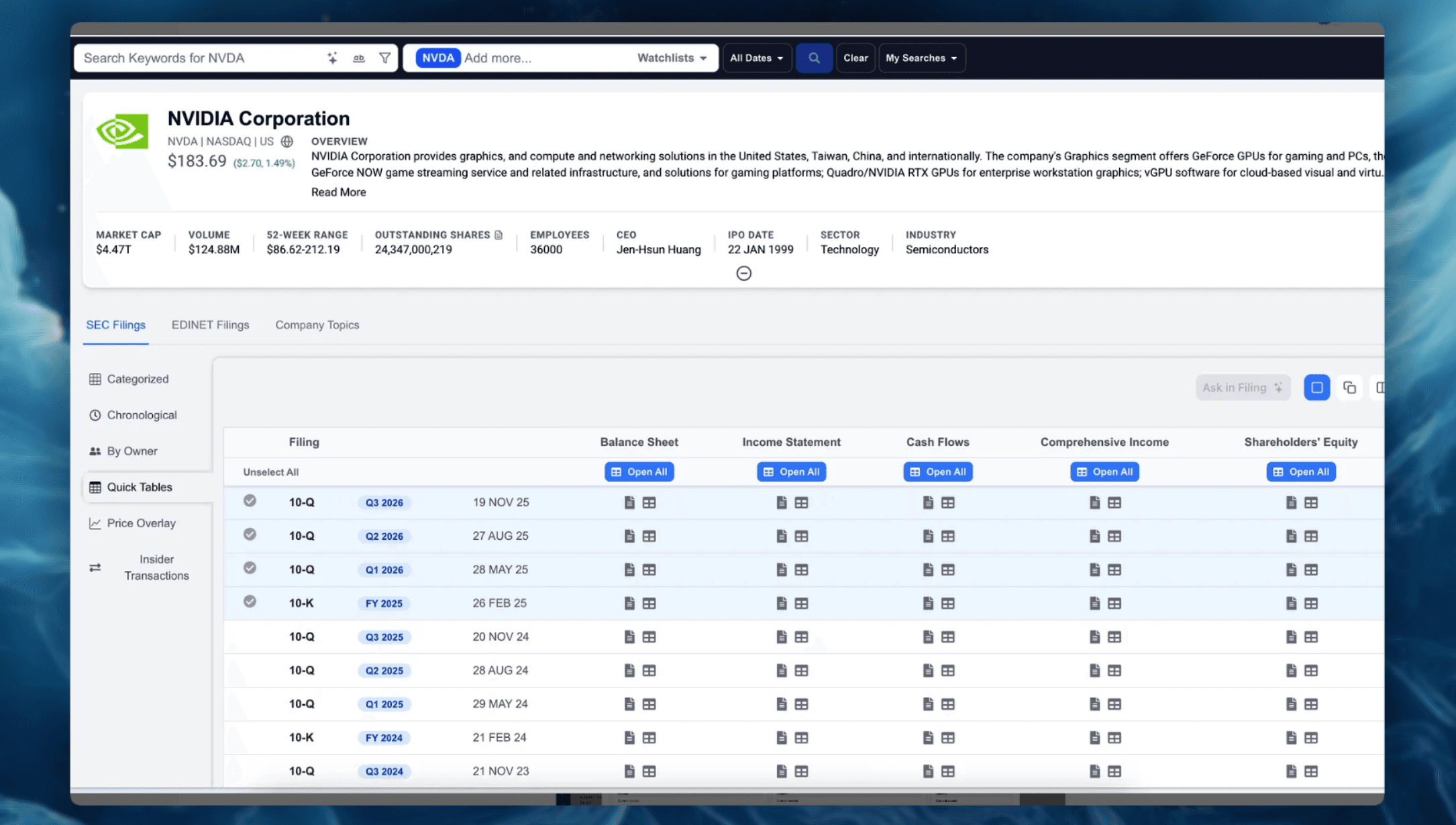
This allows analysts to surface key financial signals earlier, including:
- Margin compression and profitability erosion
- Cash flow diverging from reported earnings
- Capital returns replacing reinvestment
- Rising working capital or balance sheet pressure
Quick Tables turn year-over-year financial analysis from a setup task into the starting point of research, with Excel used only when it adds incremental value.
Comparing Balance Sheets Year-Over-Year in 10-K and 10-Q Filings
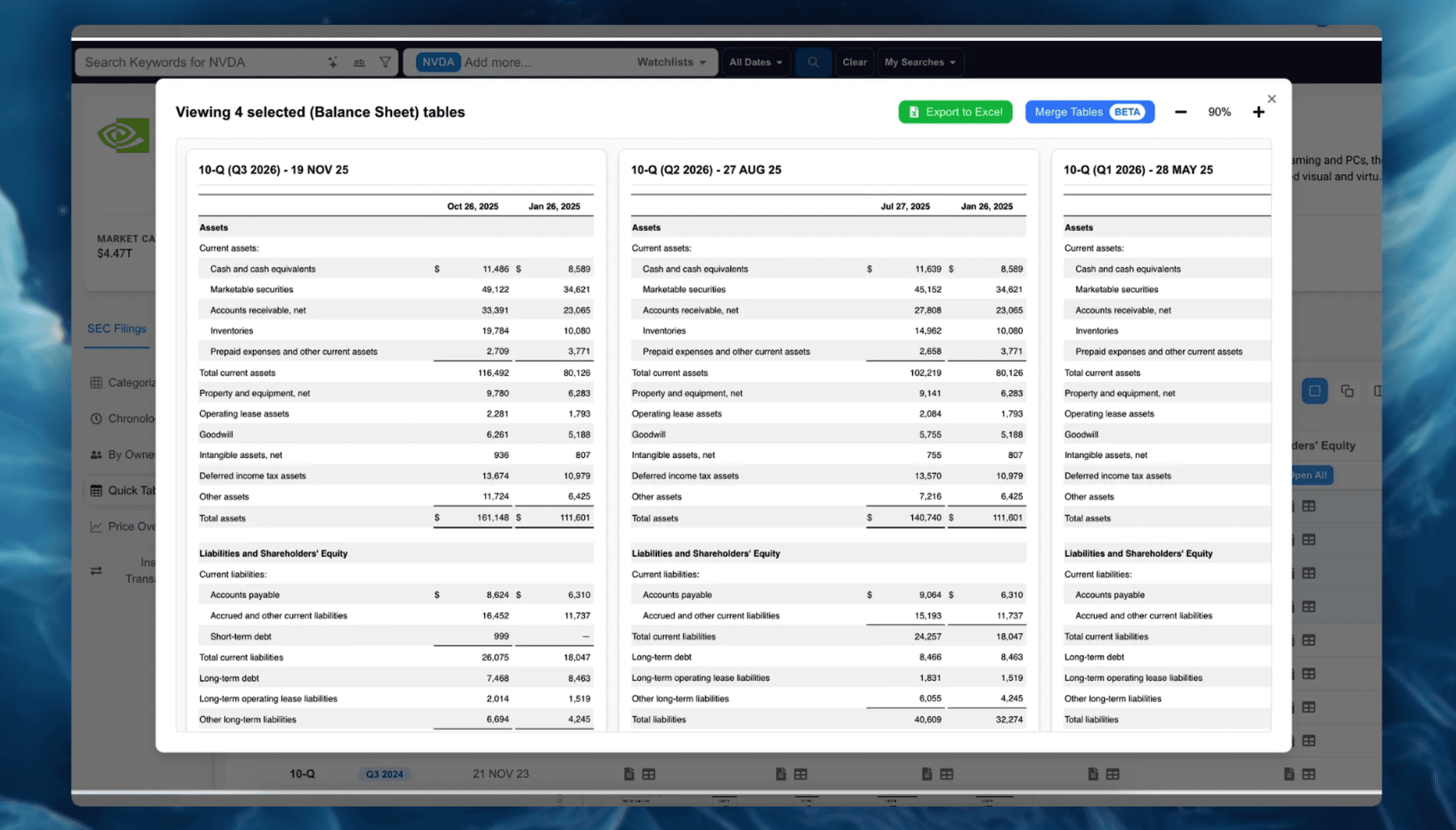
Balance sheets reveal how a company’s financial position evolves over time.
Quick Tables automatically align balance sheets across 10-K and 10-Q filings, making changes in assets, liabilities, and equity immediately comparable—without normalization or spreadsheet work.
From the same company view, analysts can move directly from a balance sheet shift—such as rising debt, declining cash, or working capital changes—to the exact filing language that explains it.
Balance sheets can be reviewed in-platform, exported to Excel in one click, and traced back to source filings—all within a single workflow.
Excel-Ready Financials That Reveal Signals Earlier
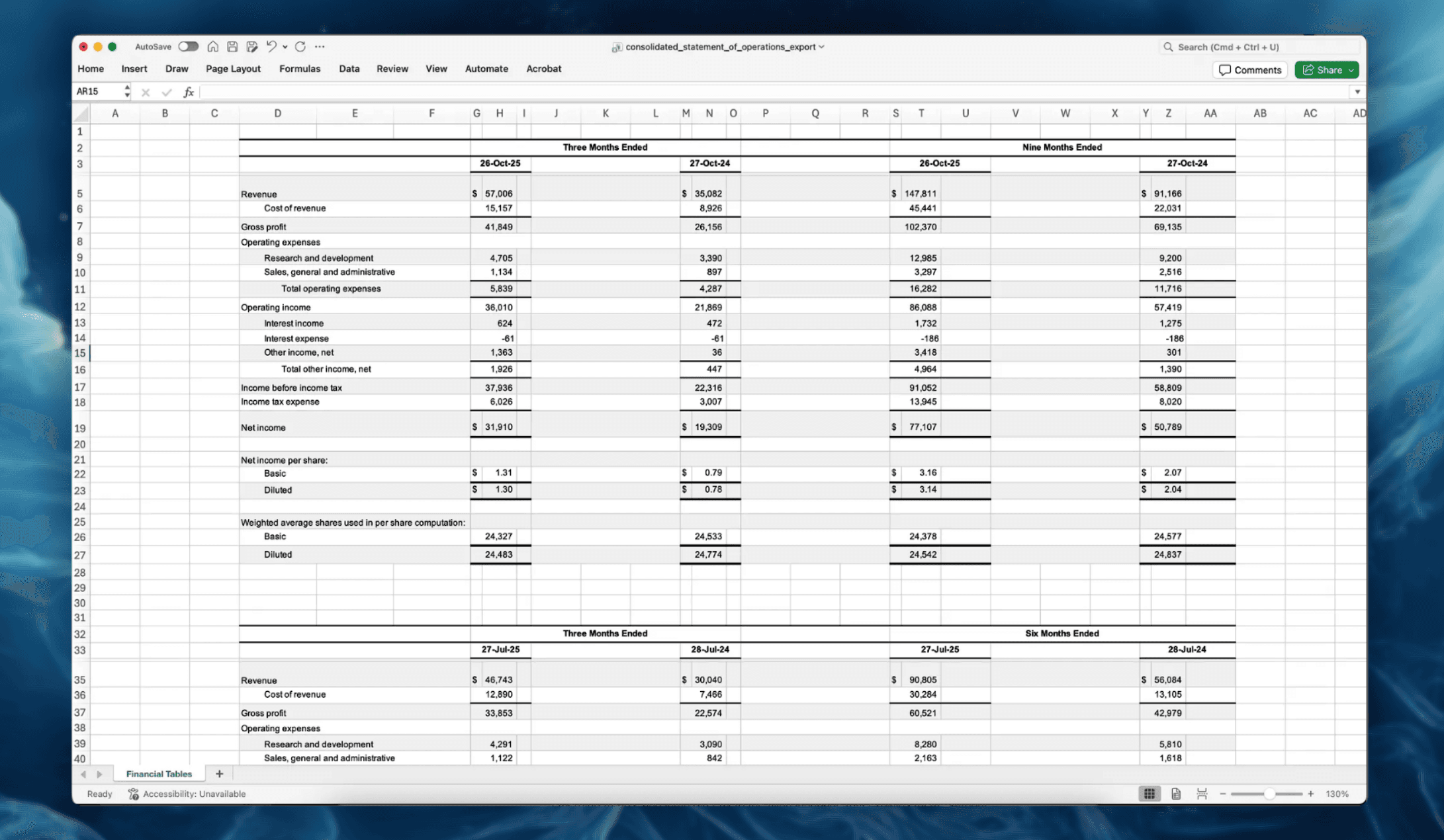
Financial signals appear in the numbers before they appear in disclosures.
Quick Tables deliver clean, Excel-ready financials by default, allowing analysts to spot year-over-year shifts immediately—and export the same structured data to Excel without reformatting.
Because financials are standardized across periods, early patterns surface faster, including:
- Capital allocation shifts before strategy language changes
- Margin and cash flow pressure before risk sections expand
- Sustained underperformance ahead of governance or compensation changes
Analysts start with objective financial movement, validate insights in filings, and carry the same normalized tables directly into Excel.
Financials and Filings, Analyzed as One Workflow
Quick Tables unify year-over-year financial analysis, balance sheet comparison, and filing review into a single workflow.
Analysts can instantly compare normalized 10-K and 10-Q financials across years, identify emerging trends, and jump directly to the filing language that explains them—without spreadsheets or tool switching. When deeper work is required, the same tables export to Excel in one click.
With Quick Tables, research teams can:
- Compare multi-year financials instantly
- Detect financial signals earlier
- Trace changes directly to source filings
- Export Excel-ready data without cleanup
- Analyze long filing histories at scale
Quick Tables redefine where financial analysis begins—with clean, comparable numbers first, and disclosures and Excel exactly when needed.
Explore Quick Tables Inside Alpha Analyst
See instant, normalized multi-year 10-K and 10-Q financials with one-click Excel export:
Related Posts
View all posts →
January 10, 2026
AI for Qualitative Equity Research: A Practical Playbook
How modern analysts turn filings, calls, and narratives into faster, more defensible investment insights

December 9, 2025
AI Search for SEC Filings, Rebuilt From the Ground Up
Search, filter, and analyze 50M+ SEC documents with AI-powered indexing, filing classification, trends analysis, and document-level insights

December 9, 2025
Translated EDINET Japan filings
A fully searchable, structured EDINET dataset - turning Japan-only disclosures into global-ready intelligence amid TSE reforms and rising foreign investment
Explore More
View all posts →
February 4, 2026
Software Stocks and AI Disruption Fears: Investor Playbook
How to evaluate “AI risk” claims, pressure-test seat-based pricing, and track what matters in filings using Alpha Analyst

February 4, 2026
Enphase (ENPH) Upgrade After Earnings: What Changed
A practical investor brief on the BMO upgrade, Q4 beat, 2026 guideposts, and how to track follow-through in Alpha Analyst

February 4, 2026
Tether fundraising report: what changed and how to track it
A practical framework for monitoring stablecoin issuer valuation, liquidity, and regulatory signals with Alpha Analyst